Content changes are a normal part of every website. Owners and authors constantly modify their content and change the information. Sometimes, 301 Redirects these changes may cause issues with our SEO efforts and bring down search engine rankings.
To prevent this, we must focus on several key methods. Although there are more ideas on how to solve this problem, one sure way to get things done is by using the 301 redirect method. This excellent tool will keep the existing traffic on the page and ensure proper SEO parameters.
You might be migrating to a new domain, changing an entire blog, and refreshing it with new information, or deleting duplicate pages. Whatever it is you’re doing, a 301 redirect will ensure search engines continue to recognize the change and allow it.
In this article, we talk about the 301 redirect status code. We will explain what it is, what other statuses there are, how to use it properly, and what issues must be tackled to get all the wheels working perfectly. Follow up and learn more about it.
What Is a 301 Redirect?
301 redirect is a status code based on the HTTP criteria that informs browsers and search engines that the web page has permanently been moved to a new location.
The “301” is important because it defines the kind of redirect as permanent and different from the temporary redirects like 302 or 307.
Hence, the Backlink Equity is transferred to the new URL in case of a 301 redirect from the old URL. Visitors or bots can be directed to the new URL without losing their SEO value.
Types of Redirects
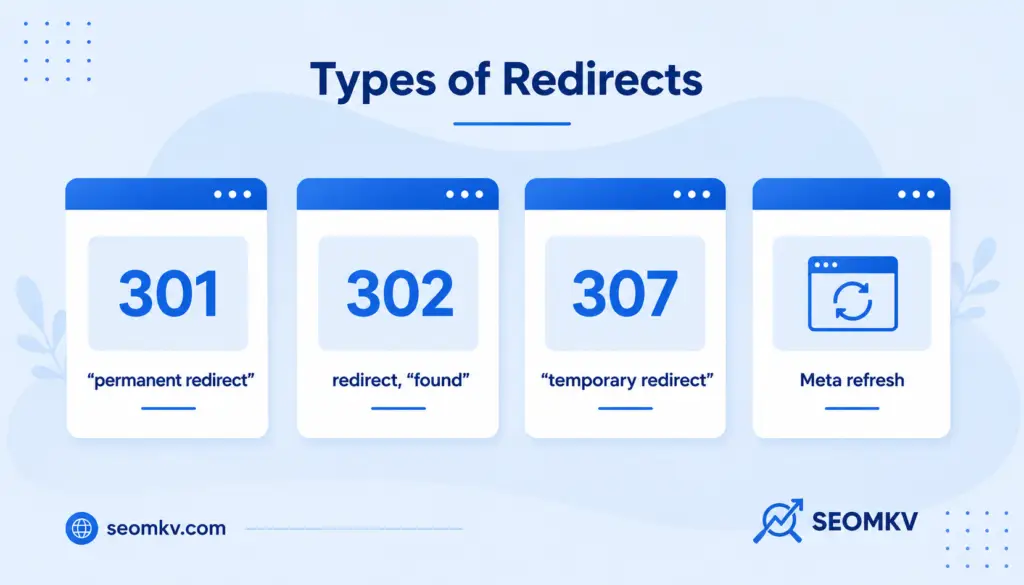
There are multiple types of URL redirects that have specific purposes with potential impact on SEO. Knowing when or how to use a permanent redirect, a temporary redirect, and a meta refresh redirect will help you avoid redirect loops, losing traffic, and broken links across multiple pages.
- 301, “permanent redirect”: A 301 status code signifies a permanent redirect, and is the most recommended choice for SEO. When properly implemented, it passes almost all of the SEO value from the previous URL to the new page. As a result, search rankings, internal links, and backlinks will function as intended, especially if you’re adjusting your url path, changing your domain name, or condensing previous pages.
- 302 redirect, “found”: A 302 redirect indicates a temporary redirect. While it directs site visitors and crawlers to a new location, search engines may choose not to pass link equity to the redirected URL and instead continue to index the original URL. The 302 redirect is best used for temporary holding pages or A/B testing, and should not be considered for a permanent change.
- 307 “temporary redirect”: A 307 redirect is an HTTP/1.1 standard for temporary redirect, like a 302, but it guarantees the method and body of the original request are preserved. Again, the additional technical accuracy is better, but it’s still not a proper method of passing SEO value. Don’t use 307 redirects when moving content permanently.
- Meta refresh: Meta refresh redirects occur at the web page level rather than through server configuration files. Typically used in HTML, they involve a delay before redirecting. Although simple, they are not SEO friendly writing. Search engines may ignore them or pass limited SEO value, so it’s better to use htaccess file or PHP header redirect for better results.
Why Is HTTP Status Code 301 Redirect Important for SEO?
301 redirects are crucial when URLs change, so you can keep your rankings. They are good for resolving broken links, consolidating duplicate pages, and helping others find your new page because the redirected pages will still show in the search engine results pages (SERP).
301 redirects also help your technical SEO. They tell bots and visitors to your site which is the preferred page, so the authority of a blog post/landing page will still show in future page rankings.
301 redirects also help create a more fluid user experience by avoiding error pages and navigation dead ends, which improves the user experience. In addition, 301 redirects facilitate backlink management since link equity transfers to new linking pages.
All of which allows you to maintain your domain’s reputation and link friend visibility. If done correctly, 301 redirects can restore lost traffic and mitigate the loss of SEO value associated with long-term investments during redesigns or modifications to content.
Ways to Implement a 301 Redirect
There are many ways to implement redirects that are related to your web server environment, CMS, or development platform. A good redirect strategy will ensure that search engines will crawl and index your pages properly while passing the authority of your old pages to your new URL.
For example, in case you opt to use the Apache-type web server, you have to incorporate 301 redirect in the .htaccess file.
For Nginx, you will create the 301 redirect within the server configuration file. Then, if it happens that you are using any of one of the CMS platforms, for instance WordPress, you could use a plugin to manage redirects and make things a little simpler.
Regardless of how you create the 301 redirects, there is still a good general practice of validating each one just to ensure that things are functioning properly and are helping with user experience and/or SEO.
301 redirects in .htaccess file
On Apache servers, the .htaccess file is utilized to declare a set of redirect rules. This is a fast and server side method, and will send the appropriate http status code, so web browsers and bots are not confused.
This is a robust method to create url redirects at a structural level. An example would be if an entire domain or a collection of several pages needed to be moved.
1. To redirect an entire domain to a new domain site
To redirect an entire domain to a new domain, add a rule to the htaccess file like: Redirect 301 / http://www.newdomain.com/. This tells search engines and site visitors that all requests from the old domain should go to the new location, retaining SEO value.
2. To redirect a single page
You can redirect a single page to a new page using a line like: Redirect 301 /old-page.html /new-page.html. This is particularly useful when updating the url slug of a blog page or replacing outdated URLs with fresh content.
3. Using Apache mod_rewrite
Apache mod_rewrite provides advanced options for URL redirect manager logic, using regex to handle dynamic redirects. It’s especially useful for large websites needing to redirect URLs based on patterns, helping with canonical URL control and resolving duplicate pages.
PHP redirect
A redirect in PHP uses the PHP header function to redirect users. It looks like this: header (“Location: http://example.com/new-page”). Just be sure that nothing is outputted before the redirect function because it won’t work. It’s a pretty neat way to manage your redirected URLs in your own custom application logic!
JavaScript redirect
JavaScript redirects work well for client-side code, such as window.location.href = ‘http://example.com/new-url’; They will work, but JavaScript redirects are not acceptable from an SEO perspective. Search engines will not always follow JavaScript redirects, which can affect indexing and ultimately rankings. JavaScript redirects should be your last option.
Using a Paid or Free WordPress Plugin

For WordPress users, installing a WordPress plugin like the Redirection plugin or Simple 301 Redirects simplifies the redirect process. These tools offer an easy-to-use interface and help manage redirect settings without editing core files.
- Install and activate the plugin: From your WordPress dashboard, navigate to Plugins > Add New, search for a free WordPress plugin like “Redirection,” and click “Install Now.” Once installed, click “Activate” to enable redirect rules functionality on your site.
- Go to the plugin settings page: After activation, go to Tools > Redirection to access the URL redirect manager. This is where you manage and track all your redirected pages, view logs, and monitor redirect chains or issues.
- Enter the old URL and the new URL: Input the old URL that you want to redirect and the corresponding target URL. Ensure the URL paths are accurate to avoid broken links or redirection to the same page.
- Choose the type of redirect: Select “301 – Permanent Redirect” from the dropdown. This ensures that search engines recognize the change and pass on the SEO value from the original URL to the new location.
- Save the changes: Click “Add Redirect” or “Save” to apply the changes. Your redirection is now live, and the plugin will monitor hits and errors through Google Search Console integration.
Top 8 Methods for 301 Redirects That Boost SEO

The right implementation of 301 redirects would go a long way in improving SEO as well as the user experience of a website.
Redirects are advised during the site migration or restructuring of content, but even one wrong implementation can severely drop the page ranking, clog crawlers’ activity, and traffic loss.
Here are the eight great ways to do your best in optimizing the 301 redirect strategy for more effective search engine performance.
1. Ensure the HTTP Version of Your Site Redirects to HTTPS
Use a 301 redirect to force all site visitors and search engines to access the HTTPS version of your site. This helps consolidate authority and improves search rankings by avoiding duplicate pages.
2. Remove Pages with 301 Status Codes from Your Sitemap
Ensure that redirected URLs aren’t listed in your sitemap. Instead, include only the correct pages, ensuring search engines index the final target URL, not outdated ones.
3. Eliminate Redirect Chains
A redirect chain occurs when one URL redirects to another, then another. This slows down load time and dilutes SEO value. Always point redirects directly to the final new page.
4. Fix Broken Links
Use tools or Google Search Console to fix redirect issues involving broken links. Redirecting to the wrong target URL or missing a page entirely can harm search engine rankings.
5. Redirect 404 Pages
Find 404 pages and use 301 redirects to point them to a relevant page or blog post. This improves user experience and preserves link equity from external sources.
6. Switch 302 and Meta Refresh Redirects to 301s
Replace 302 redirects and meta refresh with 301s if the redirect is meant to be permanent. This ensures search engines pass the authority to the new URL.
7. Identify 301 Redirect Pages with Organic Traffic
Monitor analytics for redirected pages that still receive organic traffic. Make sure the redirect target URL aligns with user intent and maintains the same keywords and content quality.
8. Identify “Bad” External 301 Redirects
Check for external pages linking to 301 redirected URLs on your site. Reach out to site owners to update the backlinks directly to the new location, enhancing technical SEO.
Find 301-Related Issues on Your Website
Problems are typical, and you should assume you will have them while doing your job. This is entirely normal. To locate 301 redirect errors, use the Google Search Console, Ahrefs, or any other piece of SEO software.
With these programs, you will easily locate redirect loops, broken links, and issues with any existing redirect rules you have established, which is very useful when properly monitoring SEO. You should complete regular audits to make sure your url redirects are working properly.
To complement the use of automated tools, it also makes sense to manually check some of your key use cases on your website to ensure they work properly following your use of 301 redirects (the problem with the tools is they are not equipped to pick up context-based errors and they can have a negative impact on user experience or conversions).
It is a good exercise to visit some of your old, bookmarked URLs and run the internal links. This type of usage represents a resilient redirect strategy that is both reliable and usable.
Read More about : best backlink checker tool
FAQs
What is an example of a redirect?
A common and practical 301 redirect is redirecting the webpage traffic from an old webpage URL, like example.com/old-page, to a new webpage URL, like example.com/new-page.
301 redirect is the best way to ensure that all users and search engine crawlers are automatically sent to the new page, keeping SEO rankings intact to avoid broken links and lost website traffic.
How do I turn off a redirect?
To deactivate a redirect means that you need to either delete or alter the rule that is employed to manage it. In WordPress,ur this usually means that you just go to the settings of the plugin you are using, and either deactivate it or simply delete the redirect entry through the URL redirect manager.
If you are using an .htaccess file to set your redirect, you will need to open the file and delete the row where the Redirect 301 or whatever RewriteRule was used.
Your hosting or CDN provider panel may differ, but go to the redirect settings in the dashboard and look for any redirection rule for the affected URL, and delete these.
Does Google penalize 301 redirects?
If done appropriately, 301 redirects do not punish site owners with Google. Actually, the 301 redirect is the most effective method of permanently moving a webpage; you will transfer SEO value from your original URL page to the new page. The object is to maintain your SEO ranking so users can still access your correct content, without interruption.
How many 301 redirects are too many?
A small number of 301 redirects in a row can be acceptable, but excessive redirects can lead to problems. Excessive redirects, particularly with more than three redirect chains, can affect loading speed, confuse users, and lead to redirect loops.
Each of these factors can influence the general user experience on your pages and, over time, could negatively impact your overall SEO strategy, so it’s best to avoid them.
How do 301 redirects impact search engine rankings?
When done properly, 301 redirects ensure that an old site or page retains its search engine visibility since they transfer most of the link equity from the previous to the new one.
In essence, even if a page is removed, its SEO value (backlinks, keyword rank, etc.) remains intact. As a result, 301 redirects play a crucial role when relocating a site, undergoing rebranding, or reorganizing a site.
How long do you have to keep 301 redirects?
We suggest maintaining a 301 redirect for at least one year to allow search engines and users to adjust appropriately.
Maintaining it for a longer duration is usually preferable, especially when discussing a page that usually attracts significant traffic or possesses strong SEO authority.
The marginal benefits of extended redirects ensure consistency in indexing and reduce the impact of changing domains on website traffic.