It’s tough to make your website stand out on Google or other search engines. Many website owners try all sorts of SEO tricks, hoping for better results. One method that works well is the use of FAQ schema. By adding FAQ schema markup to your FAQ page, you help search engines like Google understand the questions and answers provided. This helps your page show up in special features on the search results page. If you want more organic traffic, adding FAQ schema is a smart first step.
What Is FAQ Schema?
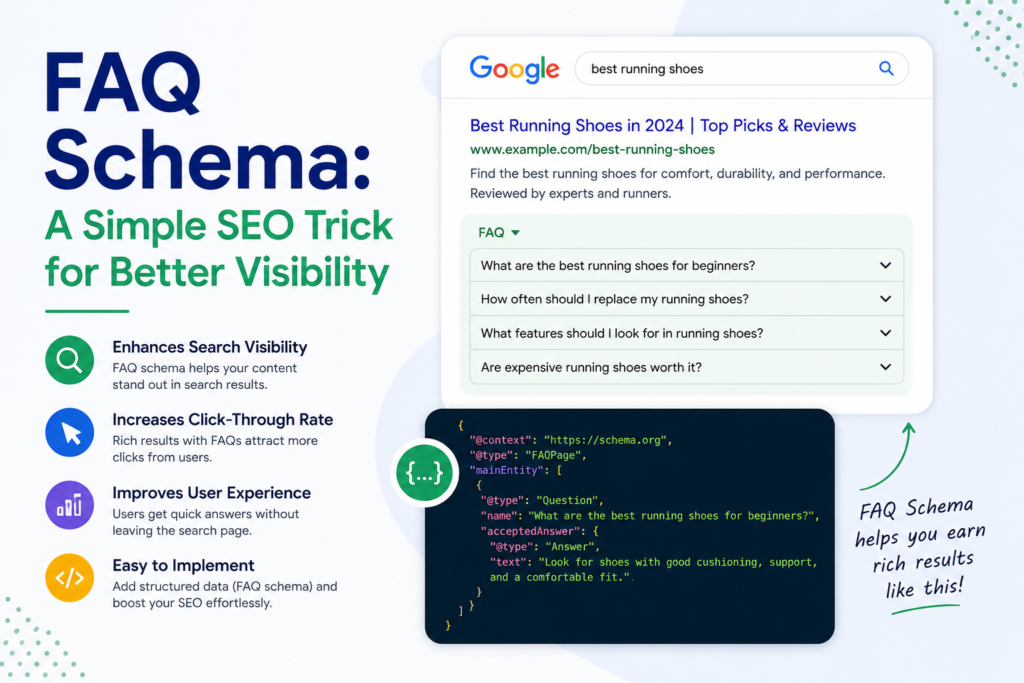
FAQ schema is a form of structured data you place in your website code. With this schema markup, you signal to search engines that certain parts of your content are made up of questions with their corresponding answers. If you add this markup to an FAQ page or a product support page, search engines like Google can pick up on this information a lot more easily. They might show your questions and answers directly in the search results, making it simpler for people to get answers straight from the results page.
Why is FAQ Schema so Important for Search Engine Optimization?
Using FAQ schema markup has a big impact on your search engine optimization. It gives search engines a clear signal about what kind of information your page holds. When you mark up your questions and answers the right way, Google is more likely to highlight them in rich results or special boxes on the search results page. This can get your website noticed by more people. With better visibility, your site can earn increased organic traffic and help you reach more visitors without a lot of extra costs.
Increased visibility
Adding FAQ schema gives your site a higher chance to be displayed as FAQ rich results. With this, your webpage can show extra information just under your main link in the Google search results. More space means your listing can catch a user’s eye faster than a normal blue link. For example, a local business in Derby using SEO services Derby to target nearby customers can benefit from FAQ rich results by answering common local questions directly in search, helping them stand out against larger national competitors. When searchers see clear, relevant answers right away, they are more likely to choose that result first.
Better click-through rates
FAQ rich snippets help your listing stand out, which means more people are likely to click your link. When users spot useful answers right in search results, they already feel confident about what you offer. This trust makes them more willing to pick your site over others. Readers like knowing you address their questions right away. If someone recognizes their question and sees you’ve answered it, they’re far more likely to choose your link because they expect to find what they need.
Featured snippet opportunities
Getting a featured snippet isn’t guaranteed, but adding FAQ schema on your page helps your chances. If your questions and answers are clear and well-structured, Google sometimes grabs them to put at the top of search results. Featured snippets show direct answers before other listings. Search engines pick out content that’s easy to read and gives straight answers. So, with well-marked schema on your questions and answers, your site is more likely to appear in these special spots that lots of people see first.
AI overview inclusion
AI is changing the way search engines show content, and it is making strong, clear writing even more important. New AI tools collect facts from different places to answer tough questions. They look for pages with neat, easy-to-understand information. If you use FAQ schema on your questions and answers, you make it easier for AI to read your data. Over time, this structured clarity can support stronger website authority, since search engines tend to trust sites that present information consistently and clearly.
How to Find the Right Questions for Your FAQ Schema?
To really make FAQ schema work, answer questions your readers actually ask—not just random or made-up ones. It helps to pay attention to what people are saying in forums, reviews, or emails. That’s how you find what matters most. When you focus your FAQ content on real problems and honest needs, you build trust. This is good for both your audience and search engines. Being useful is the main goal, because real questions get better results and show that you care about visitor needs.
Explore community platforms
You can learn a lot by spending time on forums and websites like Reddit or Quora. In these places, people ask real questions and talk about problems they face. Search for terms that match your business or topic and read the posts. These questions can give you ideas for your FAQ section, making sure what you write helps real people. Using questions from real users shows your answers are practical, not made up just for search engines.
Check the search results
Check for the “People Also Ask” boxes whenever you use Google. These show what others are searching for and what questions come up around your topic. Google pretty much tells you what is popular or on users’ minds. If you add these same questions to your FAQ page, you can match exactly what people are looking for. This isn’t guesswork; it’s right there in the search. Using these for your keywords gives you a starter list of solid questions you know users want answered.
Analyze keyword research tools
You can use tools like Ahrefs and Semrush to spot popular questions people are asking. Type in your topic, and you’ll get a spread of results, lots of real search queries, grouped by things like who, what, or how. This helps you see what people are genuinely interested in. Having these questions as part of your FAQ page means you’re likely to cover what your readers want to learn. In the end, it makes your single page stand out as a true resource.
Competitor FAQ analysis
When looking at your competitors’ FAQ sections, notice what kinds of questions they are answering for their visitors. Don’t ever copy their wording, but it helps to see what topics come up the most or which detailed questions are missing from your own FAQ. Maybe you notice that most sites in your industry cover certain issues you forgot. Look at how others group their questions or explain their answers. Try to add more details or include information that covers the topic better than what’s already on other search engines.
FAQ Rich Snippets Boost Search Visibility Almost Instantly
After you set up FAQ schema the right way, your search presence can get a boost pretty quickly. When Google comes back to your page and finds the new markup, it may begin to show your questions and answers as FAQ rich snippets in the results. Sometimes this happens in just a few days, especially if you use the request indexing feature. These snippets are more eye-catching, making your site pop out on the search page. That’s why using this type of structured data markup helps you stand out from sites that haven’t added it yet.
Double Listing Advantage
A big advantage of using FAQ schema is that your site can get shown twice on the same search results page. Your regular website link may appear, but your questions and answers might also show up in a “People Also Ask” section. This means people could see your content in two different places on one page. More spots on the page means more chances for people to click your links. Being shown twice shows Google that your site is helpful for that topic.
How To Add FAQ Schema To Your Website?
Adding FAQ schema to your website isn’t as hard as it may sound. You can go about it in a few different ways. Some website owners like using plugins, which handle most of the work for you. Others might prefer to put in the code by hand or use a tool such as Google Tag Manager. No matter how you do it, the big thing is to make sure your schema code is correct and added to your page’s source code, so search engines can actually find and use your FAQ content.
Before You Start: The Importance of Knowing Google’s Guidelines
Before putting FAQ schema on your website, you need to know what Google expects. Make sure to read over Google’s main rules, since not following them can cause problems or penalties. Your markup needs to be open and helpful—it shouldn’t just be for advertising purposes. If you try to trick the system or use the wrong type of schema, Google can pull your rich results. Check the official documentation first, so you start right, avoid mistakes, and get the best results for your entire site.
- Each FAQ must include a question and answer
Google’s rules say each FAQ marked up with schema must have its own answer. You can’t use schema to submit several questions without giving their respective answers, as both the question and the answer need to be there together. If you leave an answer out or only add the question in your code, that’s a violation. The idea here is to make sure users see rich results with full, useful details (not just lists of questions) that actually help solve what they wanted to know.
- Questions should be specific and focused
Your questions should be clear and focused, not broad or general. Each one needs to aim at a specific detail or piece of information. Let’s say you think about asking “our services”—that’s too vague. A better option is something direct, like “What is included in your standard SEO package?” This sort of wording leads visitors to answers they actually need. Targeted questions keep things easy for your readers and for search engines that process your schema markup. When you avoid confusion, your FAQ page works much better.
- Answers must provide genuine value
Your answers should be true, easy to understand, and really help the person reading them. Make sure the answer is complete so the visitor doesn’t need to go somewhere else to finish reading it. The whole answer should be inside the schema data, not spread out on other pages. Don’t use your FAQ just to stuff in links or keywords. The main point is to give users valuable information right in the search results or on your product support page.
- Content must exist visibly on the page
One rule you can’t skip over is displaying your FAQ questions and answers right on your web page. Don’t try to hide them only in your code and expect Google to show rich results. If you use JSON-LD, the info in that code must match what users can see and read on your site. When everything lines up, it keeps things fair for both your visitors and search engines. This honesty helps everyone trust your content and stops people from trying to trick the system.
Find the Right Questions to Include
Picking the right questions is the base for any good FAQ plan. Think about the things your visitors really want to ask. Covering their honest worries gets better SEO results, but also helps you gain their trust. Don’t rush, research what your users talk about and care about most. The stronger your research, the better your FAQ. A page full of valuable answers means people are more likely to turn to you when they need information. Here are some top ways to find strong questions for your own page.
- Look at Google’s “People Also Ask” sections for your target topics. These boxes give you direct insight into what related questions searchers are asking Google. Including these in your FAQ section is a great way to align your content with user intent and show search engines that your page is a comprehensive resource that can satisfy multiple related queries.
- Find out what’s popular in your niche using tools like AnswerThePublic. These platforms gather search data to show you what people are asking about a particular topic. This helps you move beyond basic queries and uncover more specific, long-tail questions that indicate a user is further along in their journey and looking for more detail.
- Gather frequent questions from your own customer support feedback. Your support team, whether through email, chat logs, or phone calls, is a direct line to your customers’ most common concerns. Turning these recurring questions into an FAQ section can save your team time and provide users with immediate self-service answers, improving the overall customer experience.
- Check out FAQ pages from others in your field, but do not copy their content. Looking at what your competitors are doing can help you identify standard industry questions you might be missing. Analyze their pages to see if you can provide clearer, more comprehensive, or more helpful answers, thereby creating a superior resource that will attract more organic traffic.
- Use SEO keyword tools to uncover question-based searches tied to your field. Many SEO tools allow you to filter keywords to see only those phrased as questions. This is an efficient way to find out what people are typing into the search bar. Answering these questions directly can help you capture traffic from users who are looking for specific solutions.
FAQ Schema Markup Implementation Process
The way you add schema markup to your website depends on your comfort level with tech. If you use a content management system like WordPress, you can use a plugin that adds FAQ schema with just a few steps, no coding needed. If you know a bit about website code, you might choose to add the JSON-LD schema by hand, which gives you more choices. Some people like to use Google Tag Manager to place the schema code on the page. With each method, your main goal is to make sure search engines pick up the FAQ content without errors.
- Implementing via a Dedicated Plugin
Many people find that plugins are the simplest way to add FAQ schema. For example, if you use WordPress, some SEO plugins let you include FAQ schema right from the content editor. This means you can set it up with just a few quick steps, without touching any code. This approach is ideal for people who are still learning the basics through a SEO beginners course, because it lets them apply structured data correctly while focusing on understanding core SEO concepts rather than technical implementation.
- Manual Setup with JSON-LD Markup
If you want more control, you can create the JSON-LD code yourself and place it in the part of your page’s HTML. Doing this takes some comfort with website code, but it means your FAQ schema will show up exactly as you want it. Writing the markup by hand can help you customize every detail. Take your time double-checking the code for small errors. When done right, search engines can pick up the structured data clearly. This option is popular with those who want full say over their site.
- Deployment through Google Tag Manager
You can even use Google Tag Manager if you’d rather not mess with your site’s main code or themes. With this method, you set up the schema through Tag Manager and apply it to whatever pages you want, all from one dashboard. It offers decent flexibility, which is great for people who like working in one place and don’t want to risk breaking anything on their site’s backend. This solution is popular for teams that want easy editing and less chance of making mistakes.
Tools for Implementing FAQ Schema
There are quite a few tools you can use to put together and check your FAQ schema. These resources can help you build the code, test your work, and make sure there are no mistakes before your changes go live. It’s smart to use them so you catch any problems early, instead of fixing things later. With the right tools, your FAQ schema setup will go smoother, giving your page a better shot at showing up the way you want in search results.
Rich Results Test by Google
Google’s Rich Results Test can help you see if your FAQ schema works with Google’s system. After adding the code, you simply use this tool to check if Google can read your data and if your webpage might show up as a rich result. It shows you any mistakes or missing information so you can fix them quickly. Before you finish updating your site, be sure to run this test. It’s one of the best ways to make sure your structured data is set up correctly.
Schema Markup Validator
The Schema Markup Validator is also an official tool, and it lets you check your structured data for simple mistakes in the code, like missing a symbol or using the wrong format. Unlike the Rich Results Test, which is focused on Google, this validator follows Schema.org’s wider rules. You can use it to check if your code is ready for Google and other search engines. Running your schema through this step helps confirm the schema type you’ve added is correct, and helps you spot issues before you go live.
FAQ Schema Generator Tool
If you don’t want to build the code yourself, there are plenty of free tools called schema markup generators that can help. Just enter your questions and answers into the form and let the tool turn them into ready-made JSON-LD code. With this approach, you can skip the confusion, copy the code you get, and add it to your site. Using one of these generators is an easy and reliable way to implement schema markup without worrying about mistakes.
Headers / Footers plugin
If you use WordPress and want an easy way to add your own JSON-LD code for FAQ schema, try an “Insert Headers and Footers” plugin. This tool lets you put your schema markup straight into the header of a single page or across your entire site. There’s no need to get into your theme files, which can mess up your site if not done right. This method is simple and helps anyone safely update their site with the correct schema code.
Common FAQ Schema Mistakes to Avoid
Using FAQ schema offers big advantages, but it’s easy to fall into traps that hurt your results or even trigger penalties. Many problems come from a few main issues. Some people use tricks or add content that isn’t honest. Others make technical mistakes with their code, like typos or missing parts, which stop the schema from working. Poor answers can also get your FAQ ignored by Google. Knowing about these common mistakes helps you get the most value and keeps your FAQ schema working as intended.
- Deceptive or Misleading Practices
Don’t try to use FAQ schema just for ads or special promotions. Google expects the questions and answers to share real information for users. If you put in content that is misleading, not true, or includes hateful or harassing language, Google could remove your rich snippet features. Stick to honest, clear facts in your answers so you keep your schema and search results safe. Always make sure your FAQ section lines up with what Google’s guidelines ask for, avoiding anything that could be seen as tricking the system.
- Errors in Technical Implementation
It’s easy to miss something small in your JSON-LD code. Even forgetting a comma or a bracket can stop the schema from working right. To avoid problems, always check your code by using the Rich Results Test. Run this tool before you add the markup to your site and again after it’s live. Testing makes sure there are no errors and helps you spot anything that could keep your FAQ schema from showing up in search features. Taking this extra step can save a lot of confusion.
- Problems with Content Quality
If you want your FAQ to help users, your answers should be complete and clear right on the page. Avoid simple responses like “click here” – that does not count as helpful. Each answer needs to explain things fully on its own, so visitors get value without leaving your site. All answer content must be easy to find and read, not hidden. When you stick to this approach, your site follows Google’s guidelines and offers honest, useful information to everyone who visits.
Need a Hand Getting FAQ Schema Set Up on Your Website?
Adding FAQ schema can feel like a lot at first, but it’s worth it if you want your website to show up better in search. You don’t have to do all the code work by yourself, though. Visibility SEO can make things much easier. Our team can help you come up with good questions, set up the schema code, and check that it’s marked up correctly for FAQ rich results. This way, your website can get all the SEO benefits, and you won’t have to worry about missing details or technical mistakes.
FAQs
Can FAQ Schema improve my rankings for Voice Search?
Yes. Voice assistants like Google Assistant usually use structured content to answer what people ask. If your page uses FAQ schema, it’s much easier for these devices to find what they need in your answers. This kind of markup helps voice search recognize your page as useful, which can lead to your answers being spoken out loud. When your FAQ follows the right format, you’re more likely to show up when someone uses voice search for information you cover.
Can FAQ Schema boost visibility in Large Language Models (LLMs)?
Yes, it can help. Big language models, which run new search features and answer engines, look for information marked up with structured data like FAQ schema. When your FAQ page is set up with this markup, these models can pick up your questions and answers much more easily. This way, your content might be chosen as a resource for AI responses. Setting things up this way can give your website more chances to be seen and to help shape answers in the latest search tools.
Which Metrics benefit from Schema Markup?
Click-through rate (CTR) usually sees the biggest boost from using FAQ schema markup on your site. When your FAQs show up as rich snippets in the search, your listing grabs more space and attention than usual, making people more likely to click. This lift in clicks often leads to more site visits, and those visitors tend to stick around because they already know your content matches their question. Over time, you may notice other numbers, like how long visitors stay or your bounce rate, getting better too.
How To Test And Validate FAQ Schema?
Testing FAQ schema on your website is pretty simple. Start by running your URL or your code through Google’s Rich Results Test. This tool lets you know if your FAQ markup lets your page show up as a rich result—and also shows any errors. Next, try the Schema Markup Validator for a second check. It looks for basic mistakes, like missing punctuation, and makes sure your structured data meets Schema.org Guidelines. Do both tests to be sure your FAQ schema is set up the right way for Google’s system.
Does FAQ Schema Help You Appear in “People Also Ask” Sections?
There isn’t a guaranteed way to show up in “People Also Ask” sections, but making a clear, well-structured FAQ improves your chances. These boxes show up when Google sees patterns in what users ask about a topic. If your answers are direct, helpful, and easy for search engines to read, you stand a better shot. Adding FAQ schema makes it easier for Google to match your answers with what real searchers want, so your page might appear in these visible spots more often.
If you want more info contact us.