What Is Google E-E-A-T in SEO? 7 Reasons Why It Is Important
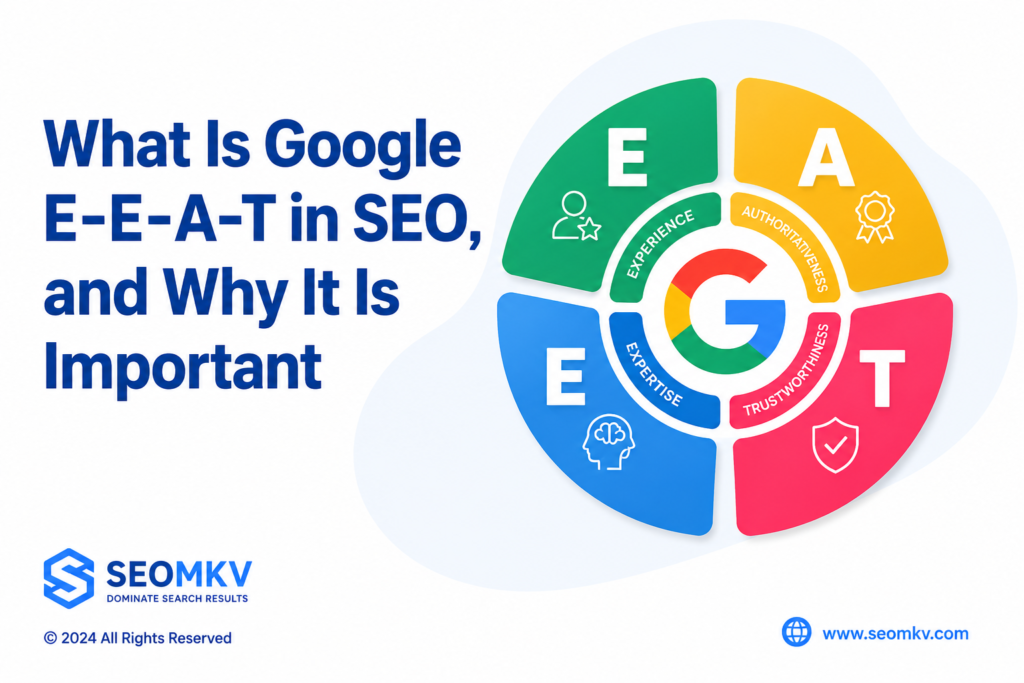
E-E-A-T stands for Experience, Expertise, Authoritativeness, and Trustworthiness. It’s part of Google’s Search Quality Evaluator Guidelines (SQEG). These guidelines help people who review Google results decide if the information is helpful and accurate. Here’s the thing: E-E-A-T isn’t a ranking factor. Google doesn’t use it directly to rank websites. But, as an SEO agency, we at Visibility SEO know that following its principles can help. Why? Because it shows Google that your content is trustworthy and high-quality. If you want your website to do well, focus on creating content that’s reliable, useful, and easy to understand. That’s what E-E-A-T is all about. And trust us—it makes a difference. What Is Google E-E-A-T in SEO? Google’s guidelines and blog updates explain why E-E-A-T matters. E-E-A-T stands for Experience, Expertise, Authoritativeness, and Trustworthiness. These four things help websites rank higher on search engines. This article will break down each factor and show you how to use them in your content. If you want your website to show up more in searches, understanding E-E-A-T is a must. Let’s get started! Experience Show that you know what you’re talking about by proving your experience. Share stories, examples, or real-life results. This shows your advice is tested and practical. Here are some simple ways to show expertise in E-E-A-T: Share personal stories: Make your content unique. Add your opinions and experiences. For example, if you’re an SEO expert, don’t just list facts. Write original content that reflects what you’ve done and learned. Show case studies: Prove your methods work. For instance, we’ve helped clients grow organic traffic by 367% and boosted SEO scores by 60%. Real results speak louder than words. Explain your steps: Break it down. Don’t just give tips—explain why they work. If you’re giving advice on SEO, share the reasons behind your suggestions. Highlight lessons learned: Talk about successes and failures. Share how your process has changed over time. For example, explain how using ChatGPT prompts has improved how you work. Discuss industry changes: Show you’re up-to-date. Talk about new trends or shifts in your field and how they’ve impacted you. Explain what you’ve adjusted and why it matters. Share collaborations: Talk about working with others. For instance, we’ve noticed how updates like Helpful Content have affected creators, so we wrote this to help. Collaboration shows you’re active and engaged in your field. Keep it real. People trust advice backed by real stories and results. Expertise Showing expertise is not just about what you know but how you use that knowledge to help others. Expertise means having deep knowledge and skills in a specific subject. Here’s how to show it in E-E-A-T: Start with a focus. What’s your niche? Pick a specific area you’re good at and stick with it. For us, as a content marketing platform, we’re all about things like social media content pillars or content calendar templates. BBQ reviews? Sure, they might rank well for SEO, but… that’s just not our lane. Share content hat actually helps people. High-quality, original, up-to-date content—stuff your audience can use. Case studies? Yes, absolutely. They’re gold when it comes to providing real value. Don’t stop at writing blog posts. That’s important, sure, but think bigger. Share your insights on LinkedIn, host a webinar, or maybe even set up a Q&A session. Why not create a space where your community can actually, you know, connect? Authoritativeness Website authority means being seen as credible and influential in your field. Search engines often measure this through backlinks from trusted sources. To build authority, focus on the following strategies: Highlight affiliations: Show partnerships with official organizations or recognized experts. For example, share reviews from platforms like G2 or Capterra. Brand mentions: Google recognizes when your brand name appears on other websites, even without a link. Being listed as a top tool in your niche helps establish credibility. Guest posts: Write for popular blogs or websites in your industry to connect your brand with trusted platforms. Author bios: Include an about page, team page, or bios for guest writers with real credentials and social links. This signals that your site is run by real people. Publish original research: Create statistics or reports that others can reference and link to. This positions your site as a trusted source of information. Trustworthiness Trust is the core of Google’s E-E-A-T guidelines. Quality Raters evaluate the creator, content, and website to ensure honesty, accuracy, and ethical practices. Avoid misleading content, manipulation, or black-hat SEO techniques. Here are key trust factors beyond your blog content: HTTPS: Websites without SSL certificates create security risks. For online stores, this can expose user passwords or credit card details to hackers. Always secure your site. Customer reviews: Reviews on your Google My Business Page or review sites show how customers feel about your products or services. Being listed in reputable directories helps build authority, but avoid links from untrustworthy sites. Contact details: Make it easy for users to reach you. Include a privacy policy, terms of service, phone number, or email address for support. Updated content: Keeping your content current shows search engines that you’re not an AI spam site but a credible source that values visitors. Social media links: Real businesses with real customers often have active social media accounts. Link these accounts on your website to confirm legitimacy. User experience: Avoid cluttered designs or excessive ads. A clean, user-friendly site signals to search engines that your content is created for users, not just for ad revenue. The Difference Between E-E-A-T and E-A-T In December 2022, Google updated E-A-T to E-E-A-T. The extra “E” stands for “Experience.” This change helps Quality Raters better assess search result quality, emphasizing the importance of first-hand knowledge of content. For instance, product reviews are more reliable when the reviewer has personally used the item. Evaluating E-E-A-T E-E-A-T is important for evaluating the quality and credibility of online content. Google’s Quality Rater Guidelines outline how quality raters assess search results. These guidelines ensure that Google Search delivers accurate and trustworthy content. Content creators who follow these principles can improve their chances of ranking higher in search results. Quality Rater E-E-A-T Guidelines Google’s Quality Rater Guidelines help