When we think about SEO, many of us focus on text, keywords, and links. But images also play a big role. That’s where image alt text comes in. Alt text helps search engines understand what an image is about. It also improves user experience and accessibility. This article explains why image alt text is important and how to write it well.
What is Image Alt Text?
Image alt text, or alternative text, is a short description you add to an image on a website. It tells browsers and search engines what the image shows if it can’t load properly. Also, screen readers use alt text to describe images for people who cannot see them. Image Alt text should be clear and relevant, helping both users and search engines.
Image alt text is not visible on the page itself but is hidden in the image’s code. When you hover over an image or if the image fails to load, the alt text may appear instead. It is a simple yet powerful tool for SEO and accessibility.

Why is Alt Text Important?
Alt text is important because it helps search engines understand your images. Search engines can’t “see” images like humans do, so alt text acts like a label. This means your images have a better chance to appear in image search results, which drives more visitors to your site.
Alt text also improves accessibility. People using screen readers rely on alt text to understand what images show. Without alt text, important information can be missed. Plus, well-written alt text can enhance the overall user experience on your site.
- Add context to boost image search visibility
Adding context through alt text makes images more visible in search engines. When you describe an image clearly, search engines can rank your page higher for relevant searches. This means more people can find your content when they look for similar images.
Context in alt text helps search engines connect the image to the page content. For example, if your page is about coffee brewing and the image shows a coffee machine, the alt text should mention the coffee machine and how it relates to brewing. This extra detail helps boost your SEO.
- Enhance UX and drive image clicks
Good alt text improves user experience (UX). When users see meaningful descriptions or hover text, they understand images better. This can encourage them to click on images or stay longer on your page.
Better UX leads to more engagement. If visitors find your images useful, they are more likely to explore your site. From our experience as an SEO agency, clear alt text has helped many clients increase both page views and image clicks.
- Boost access for visually impaired users
Alt text is essential for people who use screen readers because they can’t see images. The screen reader reads the alt text aloud, allowing visually impaired users to understand the content. This makes your website more inclusive and user-friendly.
We always remind our clients that accessibility is not just about rules but about real people. Adding alt text ensures everyone can access your content, which is both ethical and smart for business.

How Alt Text Affects SEO
Alt text affects SEO by giving search engines clues about your images. When you add relevant and descriptive alt text, your images can rank in Google Images and other search engines. This can bring in organic traffic from people searching for pictures or information.
Besides helping with ranking, alt text also contributes to the overall SEO health of your page. It supports your keywords naturally and signals that your content is detailed and user-friendly.
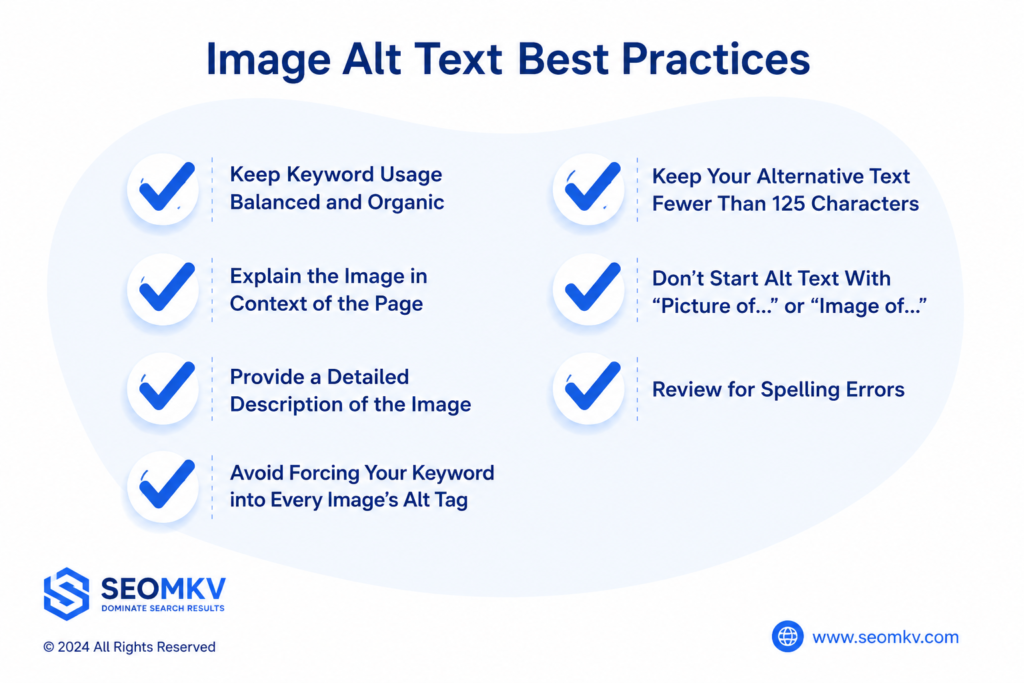
Image Alt Text Best Practices
Writing alt text requires care. The text should be brief but descriptive, telling exactly what the image shows. Avoid stuffing keywords or writing too little, as both hurt SEO and accessibility.
We advise balancing keywords with natural language. Alt text should sound like a helpful description, not a list of words. It’s about making the image understandable to everyone, including search engines.
Keep Keyword Usage Balanced and Organic
Using keywords in alt text is helpful, but overdoing it is not. If you force keywords into every alt tag, it can look spammy to search engines. Instead, use them naturally where they fit.
For example, if the image is of a blue running shoe, saying “blue running shoe” once is fine. But repeating “running shoe, running shoe” will not help. Keep it balanced and organic for the best results.
Explain the Image in Context of the Page
Alt text should relate to the page topic. If the page talks about healthy recipes, and the image shows a salad, the alt text should say something like “fresh green salad with tomatoes.” This ties the image to the page content.
We often see alt texts that describe images too generally. When alt text fits the page’s theme, it boosts SEO and makes the page clearer for users.

Provide a Detailed Description of the Image
While alt text should be brief, it must also describe the image clearly. Saying “dog” is too vague. Better to say “brown dog playing with a red ball.” This gives more detail without being too long.
Detailed descriptions help search engines and users understand what the image truly shows. It’s about balance—detailed enough, but not too wordy.
Avoid Forcing Your Keyword Into Every Image’s Alt Tag
It might seem useful to include your main keyword in every image’s alt text. But forcing keywords where they don’t belong can actually hurt your SEO. Search engines and screen readers notice when keywords are repeated too much. This looks like keyword stuffing and can lower your ranking. Also, it makes your alt text less helpful to users.
We always tell clients to write effective alt text that sounds natural. If an image isn’t directly related to your main keyword, avoid forcing it in. Instead, use appropriate alt text that honestly describes the image. For example, if your keyword is “organic coffee,” but the image shows a coffee cup, describe the cup or scene instead. This keeps your SEO balanced and your alt text useful.
Keep Your Alternative Text Fewer Than 125 Characters
Most screen readers stop reading alt text after about 125 characters. Writing concise alt text makes sure users get the full description without it being cut off. If your alt text is too long, it becomes less helpful and harder to understand.
Concise, optimized alt text also helps search engines quickly grasp what your image shows. When alt text is clear and fits under this limit, it benefits both accessibility and SEO. For more complex images, consider adding extra details on the web page itself.
Don’t Start Alt Text With “Picture of…” or “Image of..”
Some people start their alt text with phrases like “Picture of” or “Image of.” This isn’t necessary because the screen reader already knows it’s an image. Adding these words wastes space that could be used for a more helpful description.
We recommend you jump straight into the description when you edit alt text. For example, instead of “Image of a dog running,” write “Dog running on the beach.” This approach creates optimized alt text that is clearer and more concise.
Review for Spelling Errors
Spelling mistakes in your alt text can confuse screen readers and search engines. If a word is misspelled, the screen reader might mispronounce it, which makes the experience worse for users. Search engines might also fail to recognize the keywords or important terms in your alt text.
Before publishing, always review and edit alt text for spelling errors. Using spell check tools or having someone else proofread your alt text can help catch mistakes. Clean, error-free alt text is part of writing effective alt text that works well for both users and SEO.
Writing Alt Text for Different Image Types
Not all images need the same kind of alt text. Different images have different roles on your web page. Writing appropriate alt text means thinking about each image’s purpose.
Photos of people need alt text that explains who or what is shown. Icons or buttons need alt text that tells what action they perform. Complex images like charts require detailed alt text. By tailoring your alt text to the image type, you make your site more accessible and SEO-friendly.
- Logos
Logos are special images that represent a brand. The best practice is to use the company or brand name as the alt text. For example, “Nike logo” or “Apple logo” is enough.
Avoid adding extra keywords here. The alt text for logos should be simple and clear so the screen reader announces the brand correctly. This type of concise alt text helps search engines and users understand your web page.
- Charts and Graphs
Charts and graphs often show complex data. Their alt text should describe the main message of the chart, not just say “chart.” For example, “Bar chart showing quarterly sales growth in 2024” is a helpful alt text.
For complex images like these, it is sometimes best to provide detailed information nearby on the web page. That way, the alt text stays concise but users still get full context.

- Icons and Buttons
Icons and buttons usually serve a function, such as “submit” or “search.” Their alt text should describe their purpose, not just what they look like. For example, a magnifying glass icon should have alt text like “search button.”
This helps screen reader users understand what will happen if they interact with the icon. Writing effective alt text on buttons improves your site’s usability.
- People
Images showing people should have alt text that explains who they are or what they are doing. For instance, “Woman speaking at a conference” is more helpful than just “woman.”
If the person is important to the page’s content, include their name. Otherwise, focus on the activity or context. This type of optimized alt text improves accessibility and user experience.
- Decorative Images
Decorative images add style but don’t convey important information. These should have an empty alt attribute (alt=””). This tells screen readers to ignore the image.
Using an empty alt attribute for decorative images prevents screen reader users from hearing unnecessary details. It also keeps your web page clean and focused on useful content.
Add Alternative Text to Your Images
Adding alt text is simple in most website builders and platforms. Usually, there is a field where you can edit alt text when uploading or updating an image.
We recommend always adding appropriate alt text to every image. This small step boosts your SEO and makes your website more accessible to all users.
WordPress
In WordPress, when you upload an image, you can find the “Alt Text” box on the right side of the media uploader. Editing alt text here is quick and straightforward.
By filling in this field, you provide optimized alt text that benefits your SEO and helps screen reader users understand your content.
Shopify
Shopify lets you add alt text by clicking an image in the product or page editor. Look for the “Image alt text” field and type your description.
Adding helpful alt text to product images improves SEO and makes your store more accessible to all customers.
Wix
In Wix, click an image to open its settings, then find the “Alt Text” box. Here you can add concise alt text that describes the image.
This helps both search engines and screen readers better understand your website.
Squarespace
Squarespace allows you to add alt text in the image block settings under “Filename and Alt Text.” Simply enter your appropriate alt text there.
Well-written alt text here improves your site’s SEO and accessibility at once.
Weebly
Weebly users can add alt text by clicking an image, selecting “Edit,” and then going to the “SEO” tab. There, you can enter optimized alt text.
This small action improves your web page’s SEO and makes your content friendlier for screen readers.
Good image alt text requires attention. Let’s look at some common mistakes that cause missing alt text or poorly written alt text.
- Too vague
Alt text like “image” or “photo” is too vague. It doesn’t give screen readers or search engines enough information about the image.
Always write effective alt text that clearly describes what the image shows.
- Too wordy
Image alt text that’s too long or full of unnecessary detail is hard to read. Screen readers might cut it off, making it less helpful.
Keep your alt text concise but descriptive to maintain clarity and usefulness.
- Keyword overload
Using the same keywords too much in your alt text looks like spam. This keyword overload can hurt SEO and confuse users.
Focus on writing natural and helpful alt text instead of stuffing keywords.
- Missing alt text on key images
Missing alt text on important images is a common problem. It means screen reader users miss key content, and you lose SEO benefits.
Make sure to add appropriate alt text to all important images on your web page.
Improve SEO and Accessibility With Effective Alt Text
Alt text is a small but powerful tool for improving your site. It helps search engines understand your images, improving your SEO. It also makes your site usable for people with disabilities who rely on screen readers.
We often see big improvements when clients fix missing image alt text or rewrite poor alt text. Writing effective alt text is a simple step that leads to better traffic and user experience.
Learn more about What Is Google E-E-A-T
FAQs
What is an image alt text example?
Image alt text gives a short, clear word description of a picture for screen readers and broken links. Good alt text examples include descriptive photos, brand logos, and action icons.
What is alt text on images for SEO?
Image alt text is a short written description added to an HTML image tag that helps search engines understand an image, displays if the image fails to load, and assists screen readers for accessibility.
What is a good example of alt text?
Good alt text is concise, describes the image’s function or visual content, and avoids redundancy. Avoid phrases like “picture of”. Base the text on the page’s context.
Which image format is best for SEO?
Final Thoughts – Choosing the Right Image Format for SEO
WebP: Great for modern, image-heavy sites that prioritise speed.
JPEG: Best for detailed photos and images with many colors.
PNG: Ideal for logos, icons, and transparent images.
SVG: Perfect for scalable logos, icons, and vector-based graphics.
What is the optimal alt text format?
The optimal image alt text format is concise alt text that clearly describes the image without extra words like “image of.” It should be appropriate alt text related to the web page content. This helps screen readers communicate the image to users and supports SEO.
How long can alt text be and is there a limit for decorative images?
Alt text should be fewer than 125 characters so screen readers can read it fully. Decorative images should have an empty alt attribute (alt=””) to avoid cluttering the screen reader experience. This keeps your site accessible and clean.
Is alt text a ranking factor?
Image alt text is a ranking factor, but not a major one. It helps search engines understand images, boosting your site’s presence in image search. Also, optimized alt text improves accessibility, which indirectly supports SEO.
What is the difference between alt text and image description?
Alt text is concise text in the web page’s HTML that screen readers use. Image descriptions can be longer and visible on the page as captions or nearby text. Alt text focuses on accessibility and SEO, while descriptions give extra detail for all users.
Why is alt text showing instead of an image?
Alt text appears if an image fails to load due to slow internet or broken links. It ensures users still understand what was meant to be shown, keeping the web page informative even when images don’t display.